
How to Build an SEO-Friendly Site Structure
Sep 30, 2026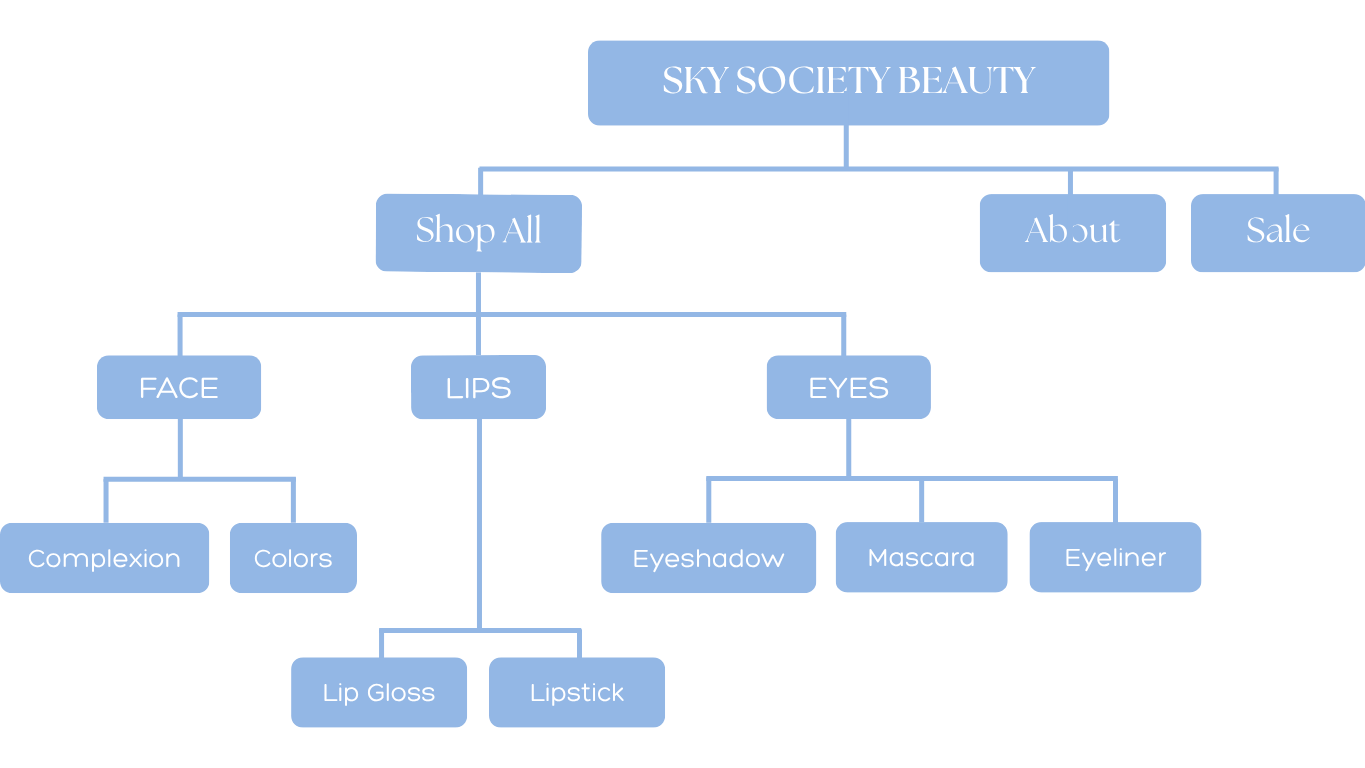
The way your website pages are organized can have a much larger impact on your site's performance than you probably realize. Building an SEO-friendly site structure helps to create a smoother user and search engine experience, resulting in your website being easier to manage as well.
Learn how to organize your site's pages to create a smooth experience for site visitors, improve search engine crawling ability, and create a more logical website hierarchy that will keep you organized over time.
What is Site Structure?
Site structure refers to how the pages of your website are organized. The structure of your site influences how users move from one page to another and how search engines navigate and analyze the content. A well-organized website can enhance consumer experiences, improve SEO rankings, and improve back-end website management.
The most common design for websites is a hierarchical structure; this layout places one page at the top, labeling it the most important, and each page connects and trickles down from there. The hierarchical structure is commonly used because of its ease of use by both users and search engines. Users have a clear understanding of what's most relevant and where they should go next, and search engines can easily index your pages according to importance.
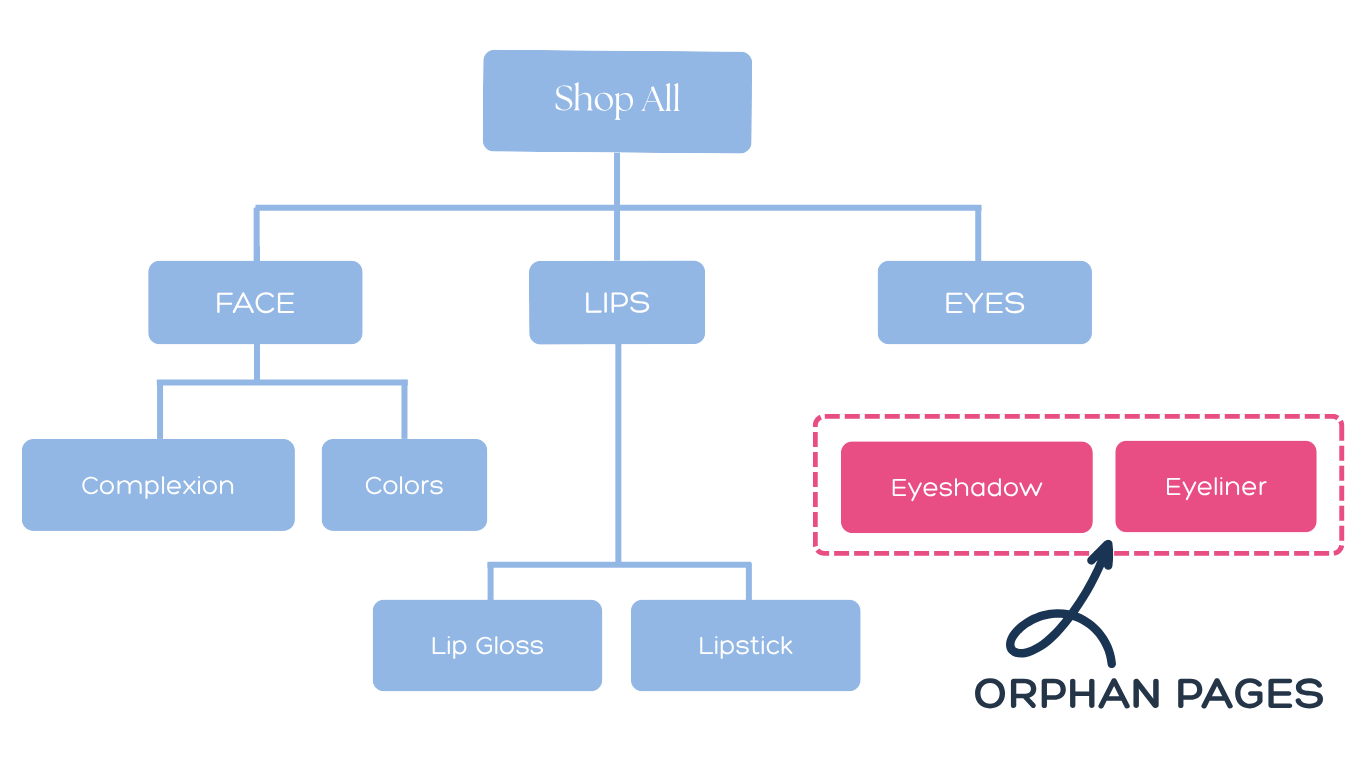
The flow chart pictured below demonstrates a hierarchical website structure. Beginning at the top would be the home page (the most important page), followed by the next most easily accessed pages, and all other related pages linked from there.
How Does Site Structure Work?
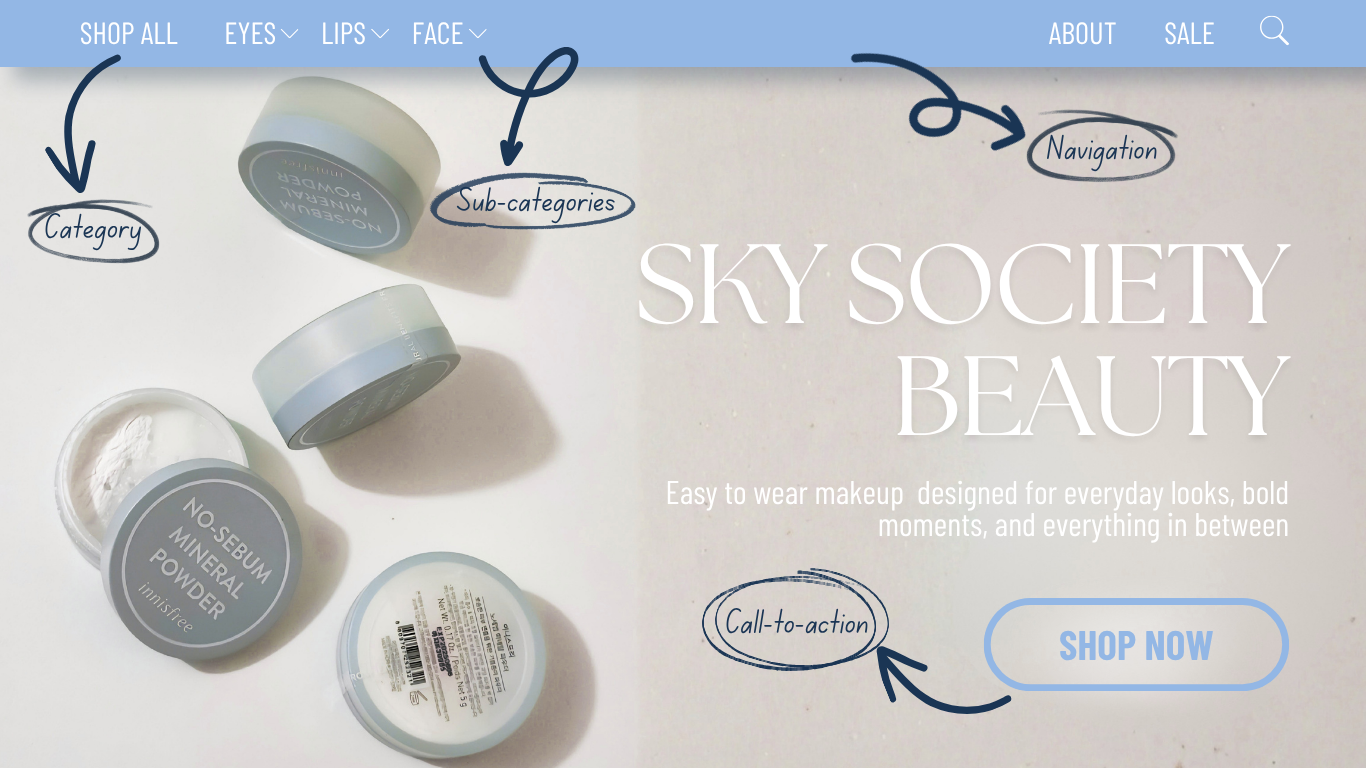
In order for your website to have a clear hierarchal structure, all pages must be categorized and organized according to the user's journey. The most important information should be easy to find. From there, users should be able to explore other pages based on their needs. Additional web elements include landing pages, categories and sub-categories, navigation, and links.
Categories and Sub-categories
Categories aid in the organization of your site's structure by grouping pages that have similar content. An example of a category could be a "Shop All" page and the sub-categories would be the specific product pages.
Navigation
Your website's navigation clearly lays out all of the pages available to the user. This is most commonly seen as a menu bar or heading. The navigation often links to category and sub-category pages like "About," or "Contact."
Links
The links you provide in your website should be placed thoughtfully and should be clearly marked to users. The three types of links you might use in your website are call-to-action links, internal links, and external links.
Call-to-action links should be marked obviously and displayed strategically. This is where a user will click to make a purchase, contact, or sign up. CTA links can help turn site visitors into customers/conversions.
Internal links are any link that sends the user to a page connected to your website. These links should be easily traceable and clearly organized to avoid confusion.
External links are any link that sends the user to content that is not your own. These are most commonly seen as references for information or images.
Why is Site Structure Important?
User Experience
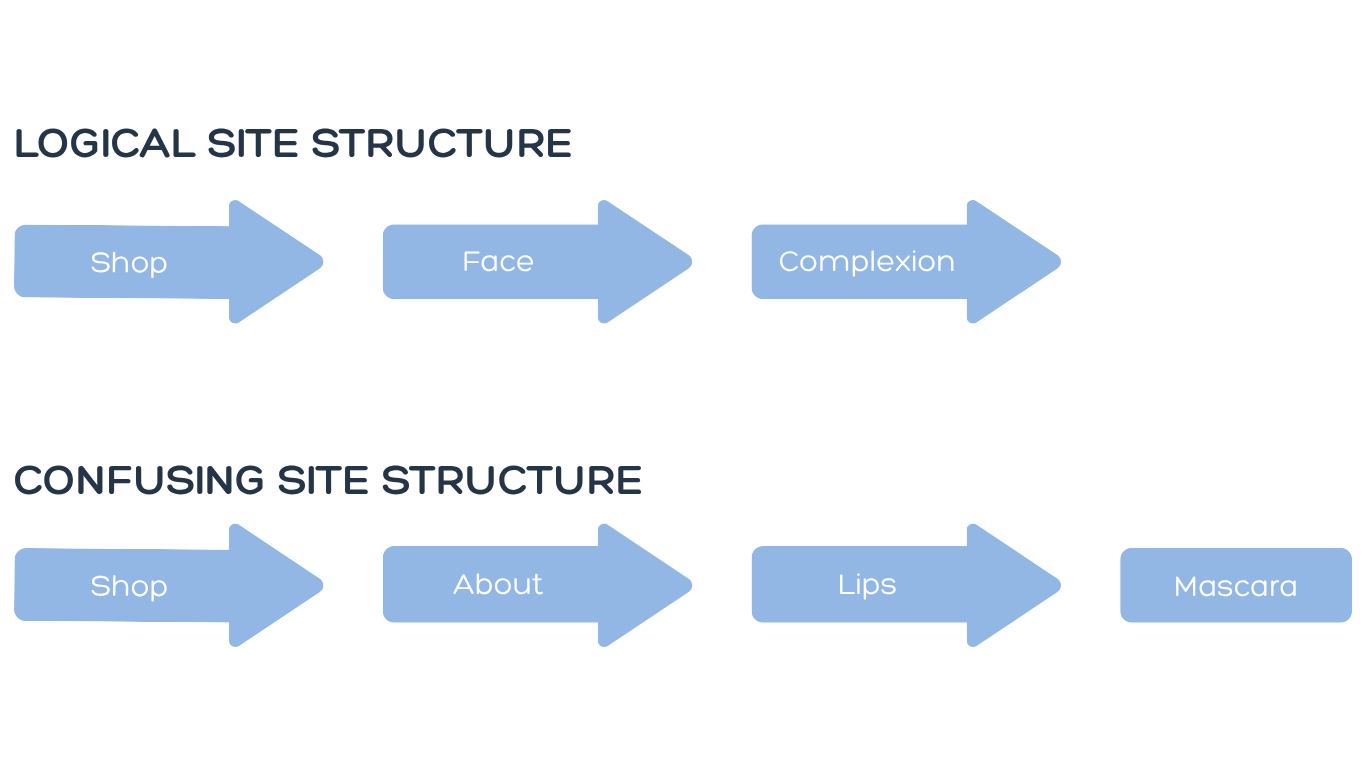
A well-planned website structure is imperative for a smooth user experience. A logical structure makes it easier for users to find what they're looking for and complete desired actions.
Search Engine Optimization
A good website structure can improve your visibility by giving search engines important information about the content on your site. Your website doesn't just tell audiences who you are or what you sell, it also helps search engines understand who your website should be recommended to.
Search engines, like Google, use "crawlers" to find new and updated content to push to users. A good website structure can improve your SEO by helping search engine crawlers understand and index your content more easily.
Management and Organization
Improving your site structure can also improve internal communication, efficiency, and assist in growth over time.
Having a clear site structure allows for more seamless communication across teams, helps individuals know where specific content belongs, and helps prevent duplicated or missing information.
Over time, your website will inevitably evolve, and as it does, so will your content. Whether you sold out of a specific product, want to link to a new social page, or decided to ditch the old newsletter, you'll need to make adjustments. Keeping your webpages organized is a great way to simplify the updating process.

Common Website Structure Mistakes to Avoid for Better SEO and User Experience
Orphan Pages
Orphan pages are pages that are not linked anywhere else on your website. Instead of having a "parent" webpage that includes its internal link, it stands on its own.
Orphan pages can negatively affect your SEO and your user experience. With no internal linking, search engine crawlers have no way of finding these standalone pages. If crawlers can't find your page, they have no way to index it and no way to assess whether to recommend it to users. This results in a page that could go relatively unseen in search results.
Without any internal links pointing to related pages, orphan pages often go unseen by visitors. The only way a user could access an orphan page is by searching the exact URL, and even then, once they get to the page, they're stranded.
The Fix:
All you have to do to ensure your website does not include any orphan pages is include a link from one page to another. Make sure all of your pages link back to somewhere else on your website and perform frequent auditing to make sure you don't have any broken links.
Poor Mobile Content Structure
It can be easy to think of a website as a desktop-only platform, but today, consumers are searching and purchasing on their mobile devices more than ever. While mobile search can be a huge opportunity for your website, it needs to be done properly.
Mobile device pages are not only constrained by smaller spaces, they also present several technical challenges for design and logistics. Mobile webpages also result in slower page loading and less precise clicking.
The Fix:
If you do not already have a website, design for mobile use first. This might sound backwards, but it makes sure that your site properly displays on users' phones and devices.
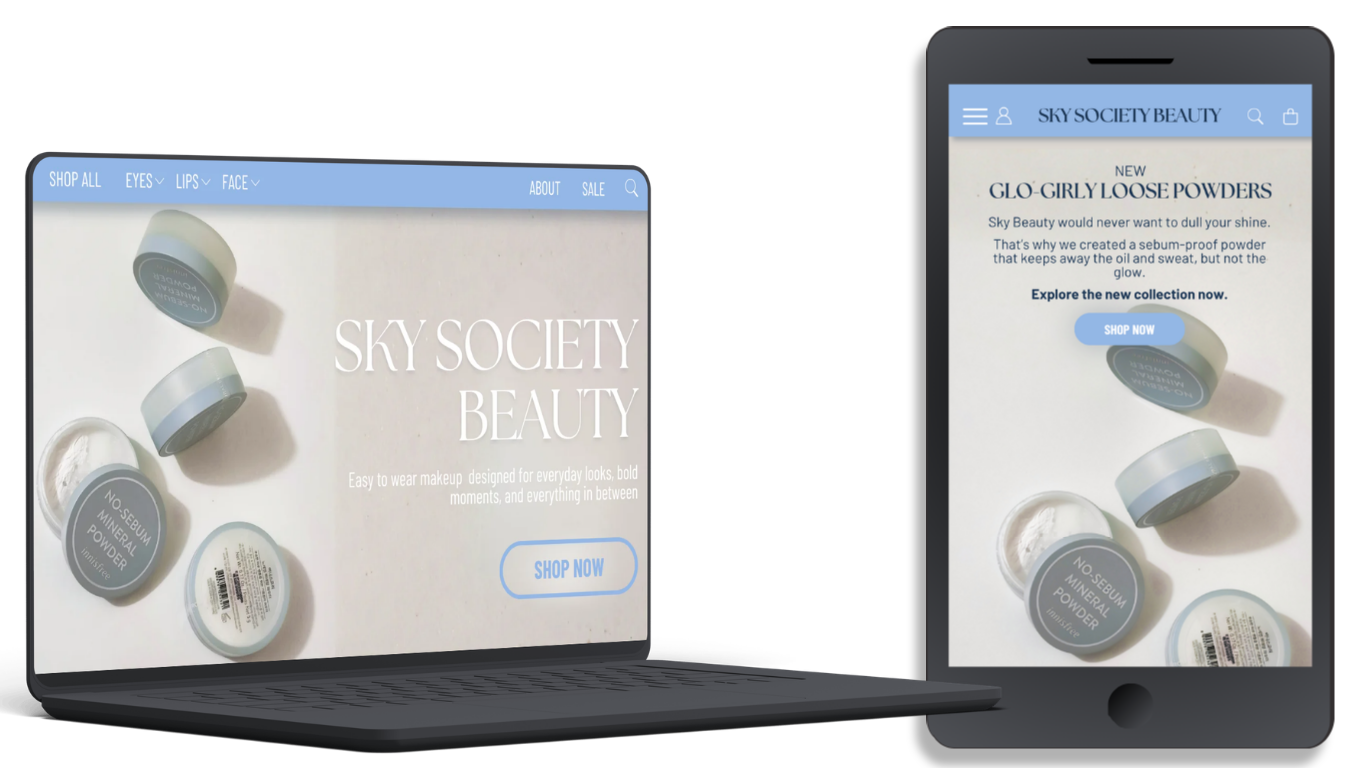
Because of the limited space and vertical formatting, your webpages will need to be restructured according to your needs. Design elements can be slightly redesigned to better fit mobile user needs. For example, using a "hamburger" menu to list the same heading links available on desktop.
Personalization and content may also need to be adjusted. Ads and suggestions may be more targeted to remove distractions and be more efficient. Call to action buttons may be enlarged and moved forward to prevent accidental clicks.
Below you can see an example of a website's desktop view vs. the mobile view. Note the changes in navigation, layout, and content.
Confusing Navigation
Complicated navigation is not only confusing to users, but it can also decrease traffic to your website. Frustration can lead to users exiting the site without even exploring your most important pages, resulting in higher bounce rates.
The Fix:
Simplify your navigation by removing any old or unnecessary pages, combining repetitive content, and keeping themes and content consistent across all pages.
Limit your number of menu items, whether it be in your navigation or header, and always use simple and clear titles. The pages listed visibly on the home page should be your most important pages, think "shop" or "contact."
Too Many Layers in Site Layout
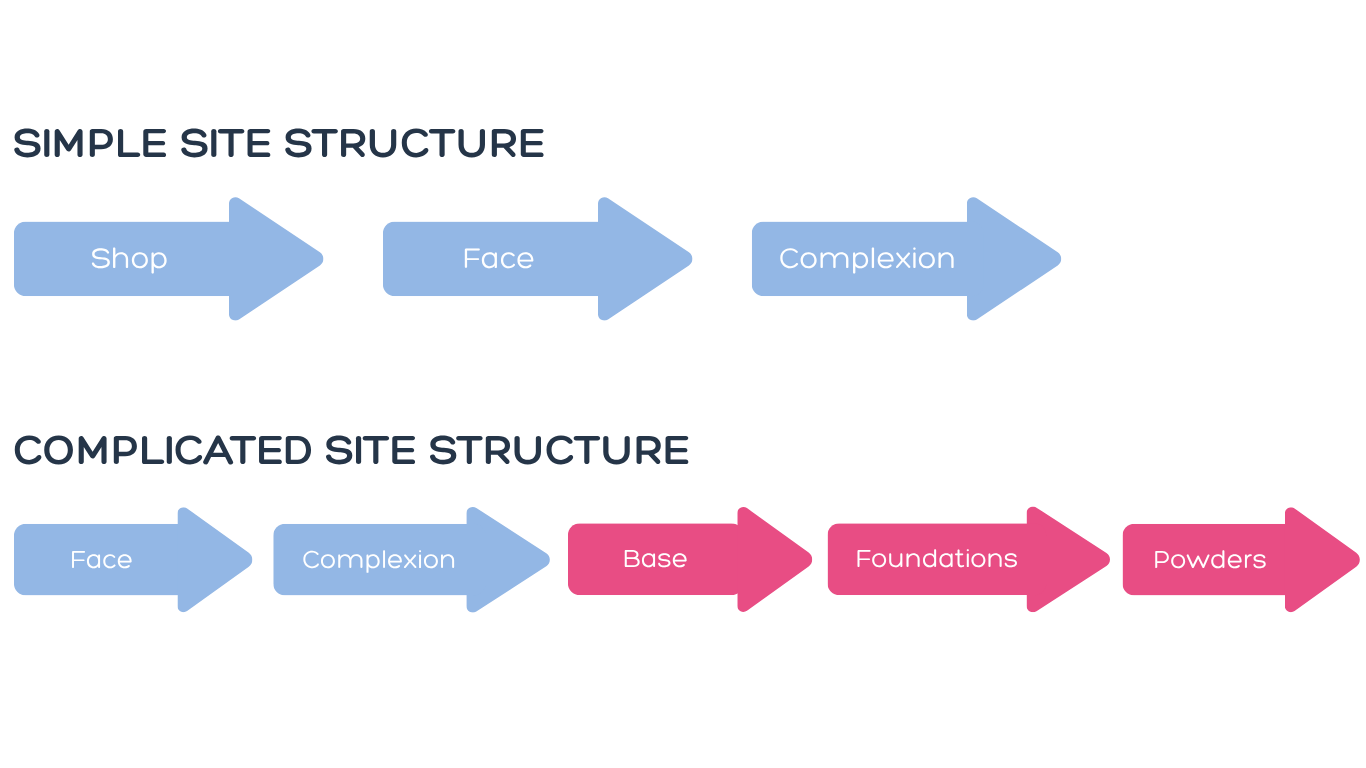
A website with too many layers creates a barrier for users to get to the page that is their end goal. Similarly to a complicated navigation, a deeply layered webpage can cause users to become frustrated or impatient. The more a specific page is buried behind other pages, the less likely users are to find the page, and the more likely it is that your bounce rate will increase.
The Fix:
Simply combine pages with similar content and ensure that all pages are linked back. Remember that it's okay if a user has to scroll down to view more.
Conclusion: Build a Better Site Structure for SEO and User Experience
Your site structure is defined by the way your pages are organized and directly impacts your reach and SEO visibility. An optimized site structure benefits your users, your SEO, and you. That's wins across the board.
When building or evaluating your site, create clear categories, use logical page hierarchy, and avoid common mistakes like orphan pages. If these recommendations sound intimidating or you don't know where to start, begin by doing an internal audit and double-checking all of your internal links.
Try to view your website as an external user; how would you organically explore content and click through pages? Don't overcomplicate things; sometimes, a well-structured site is a simpler site.
But keeping things simple doesn't mean you can set up your site structure and forget about it. As your website grows and changes, so will your site's needs, and your web structure should demonstrate that. It should be constantly evolving, audited, and maintained in order to stay relevant to your users and search engines.
🪽 Written by Sydney Perich
join 45k marketing girlies
Private Marketing Girly LinkedIn Group
A private community where young women in marketing network, collaborate, and support each other.